WEEX AI Trading黑客松参赛指南
欢迎进入竞技场——通往 Alpha 觉醒之路
Alpha 觉醒:WEEX AI Trading 黑客松 —— 全球 AI 交易黑客松!
在这场终极对决中,来自全球的顶级开发者、量化研究员与交易员将把各自的算法投入真实市场的实盘战场,展开正面对抗,角逐AI加密交易史上最丰厚的奖池之一:总价值 88万美元,其中冠军将独得一辆宾利Bentayga S。
本指南将从报名到赛事正式启动,逐步带你完成所有必经流程。
沿着这条路径,开启你的征程:
注册并组建团队 → 通过 API 测试 → 模型调优 → 正式开赛
第一步:注册、创建并提交 BUIDL,获取你的 API Key
点击查看注册教程视频:https://www.youtube.com/watch?v=yeJaQRN9spA
目标: 完成官方报名,创建或加入一个团队(BUIDL),并通过审核以获得专属 API Key。
结果: 你将获得用于连接 WEEX 系统的独家 API 凭证,正式迈出参赛的第一步。
访问 AI Wars:WEEX Alpha 觉醒活动页面
- 打开活动页面: https://www.weex.com/events/ai-trading
- 找到并点击 「Submit BUIDL」 按钮
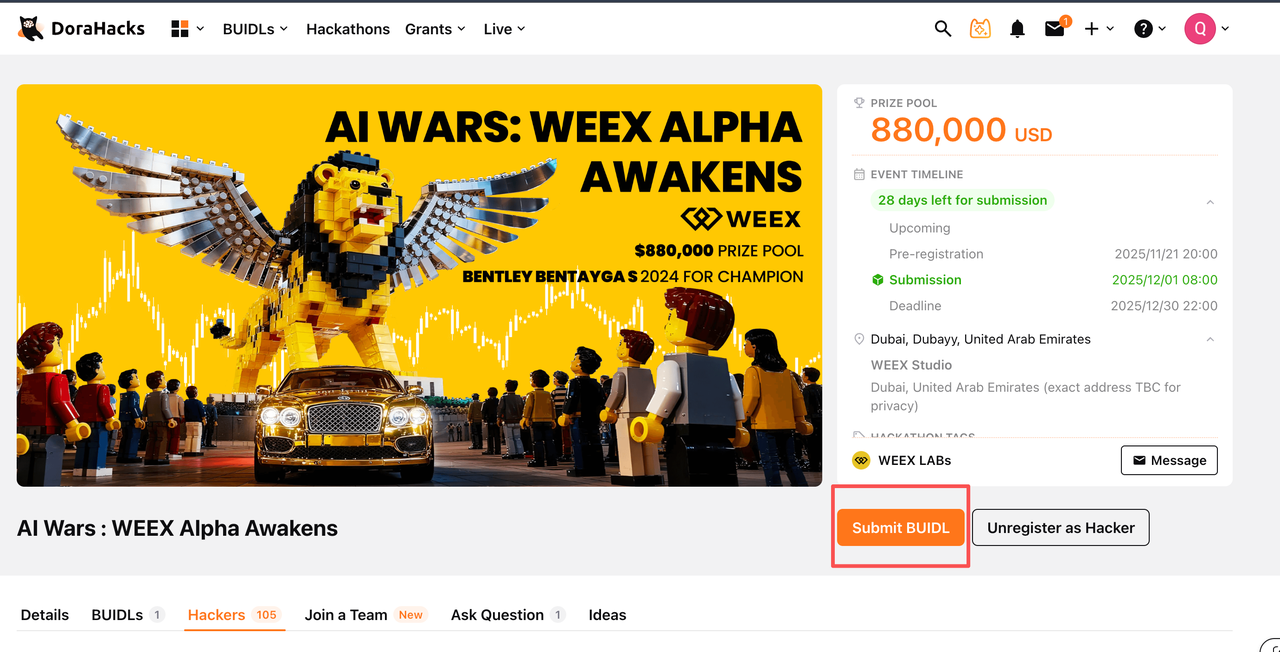
1.2 加入已有团队或创建你的团队
A BUIDL 是本次比赛的参赛形式,每个 BUIDL即代表一支参赛团队。 你可以选择加入已创建的 BUIDL 团队,也可以从零开始创建自己的团队。
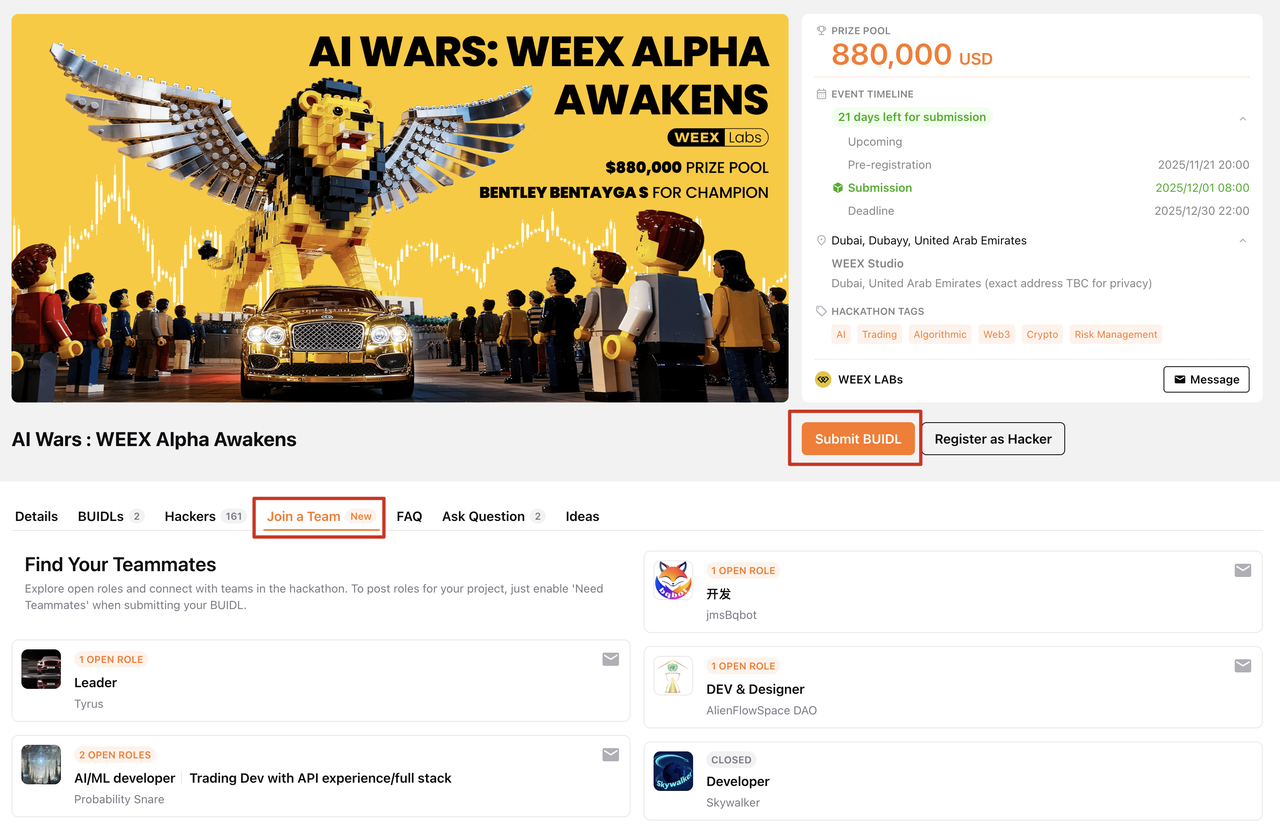
如果您选择创建自己的BUIDL,需提交以下信息:
基本信息:
- BUIDL 名称
- Logo
- 团队愿景
- 所属方向 / 赛道
- GitHub(可选)
- 社交媒体链接
团队介绍
- BUIDL 的简要介绍
成员信息
- 团队成员资料
- 可在此邀请或招募团队成员
联系方式
- Telegram 联系方式
- 备用联系方式
参赛信息提交
- WEEX UID(需先完成 KYC)
- IP 地址(该 IP 将加入 WEEX OpenAPI 白名单,用于确保 API 调用正常)
- 常用编程语言
- 是否具备大语言模型(LLM)、AI 辅助交易、自动化交易机器人或其他交易所 API 的相关经验
- 策略预计每日下单数量
支持个人参赛,但我们更建议组建 2–5 人的跨职能团队(如:开发者 + 量化研究员 + 交易员),以提升整体竞争力。
1: 如何完成 KYC 并找到你的 WEEX UID
报名参加 WEEX 全球 AI 交易黑客松 前,你需要准备一个已完成 KYC 的 WEEX UID。以下是具体操作步骤:
-
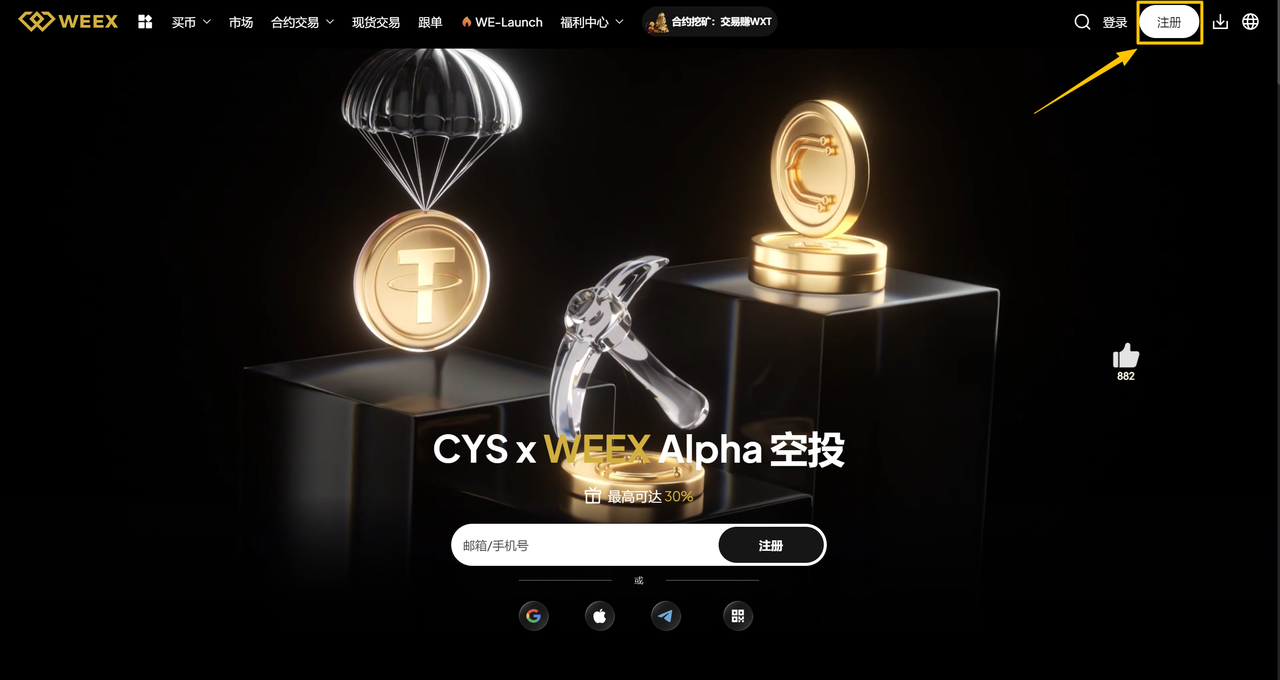
注册 WEEX 账号
点击 链接 进入 WEEX 官方网站,点击右上角 “注册” 按钮,使用邮箱或手机号完成账号注册。
注意: 如果你已经有账号,可直接点击右上角 “登录” 进入个人中心。
-
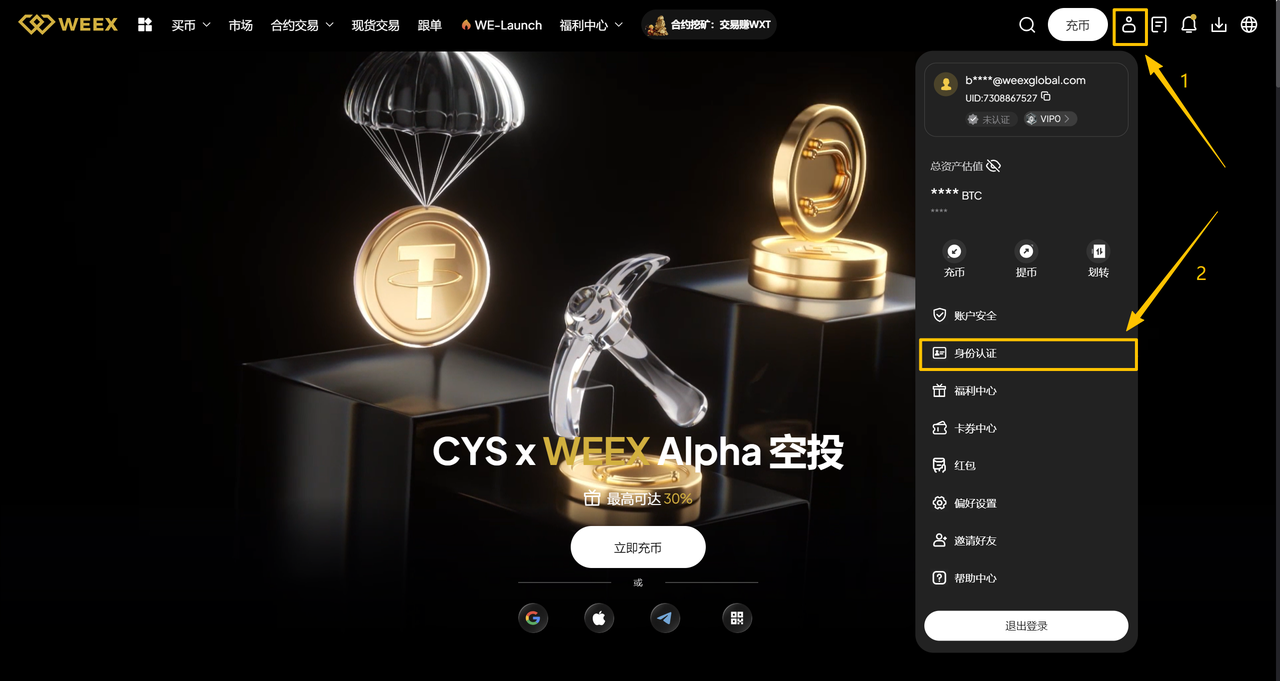
完成身份认证(KYC)
点击右上角头像,选择 “身份认证”,按照指引完成 KYC 验证。
注意:KYC 为必需步骤,未完成 KYC 的提交将无法通过审核。
-
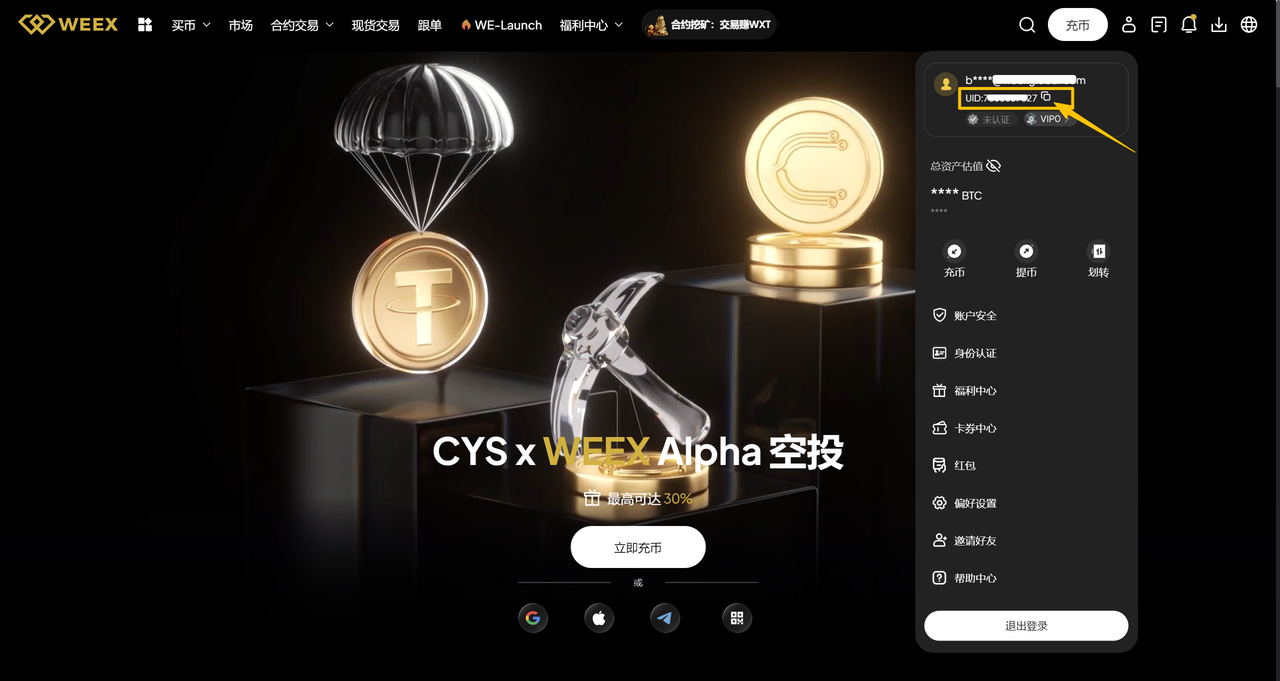
查看你的 UID
再次点击右上角头像,即可在邮箱下方看到你的 UID。
2: 如何查找你的 IP 地址
方式一(推荐):使用云服务器
为确保系统稳定运行,我们强烈建议使用具备固定公网 IP、支持 7×24 小时运行的云服务器,例如: AWS(Amazon Web Services)、阿里云、腾讯云 等。
方式二(备选):使用本地电脑
如果你选择在个人电脑或家庭网络上运行交易机器人,请务必确认你的对外 IP 为固定 IP。
IP 频繁变更将导致 API 连接异常。
你可以通过以下两种方式确保 IP 稳定:
- 使用由 网络服务商(ISP) 提供的固定 IP
- 使用具备固定出口 IP的 VPN 或代理服务(并确保全程开启,且不切换节点)
如何查看本地公网 IP
- 关闭所有 VPN,或仅保留你计划加入白名单的那一个
- 在浏览器中访问 whatismyip.com
- 页面将显示你的 公网 IPv4 地址
- 复制该 IP,并提交至白名单
大多数家庭宽带的 IPv4 地址为动态 IP,可能会定期变更。为避免比赛期间出现连接中断,强烈建议使用云服务器环境。
1.3 信息缺失?我们将主动联系你
提交 BUIDL 后,WEEX 团队将根据比赛要求对你的申请进行审核,审核时间通常为 1 个工作日。
如发现信息缺失或需要进一步确认,我们将通过以下渠道与你联系:
- DoraHacks 站内消息
- WEEX 官方消息系统
- 你提交的联系方式(Telegram、X 等)
请确保你的联系方式保持可用并及时查看。
一旦 BUIDL 审核通过,你将收到比赛专用账号及专属 API Key,并可进入下一阶段:API 测试与模型集成。
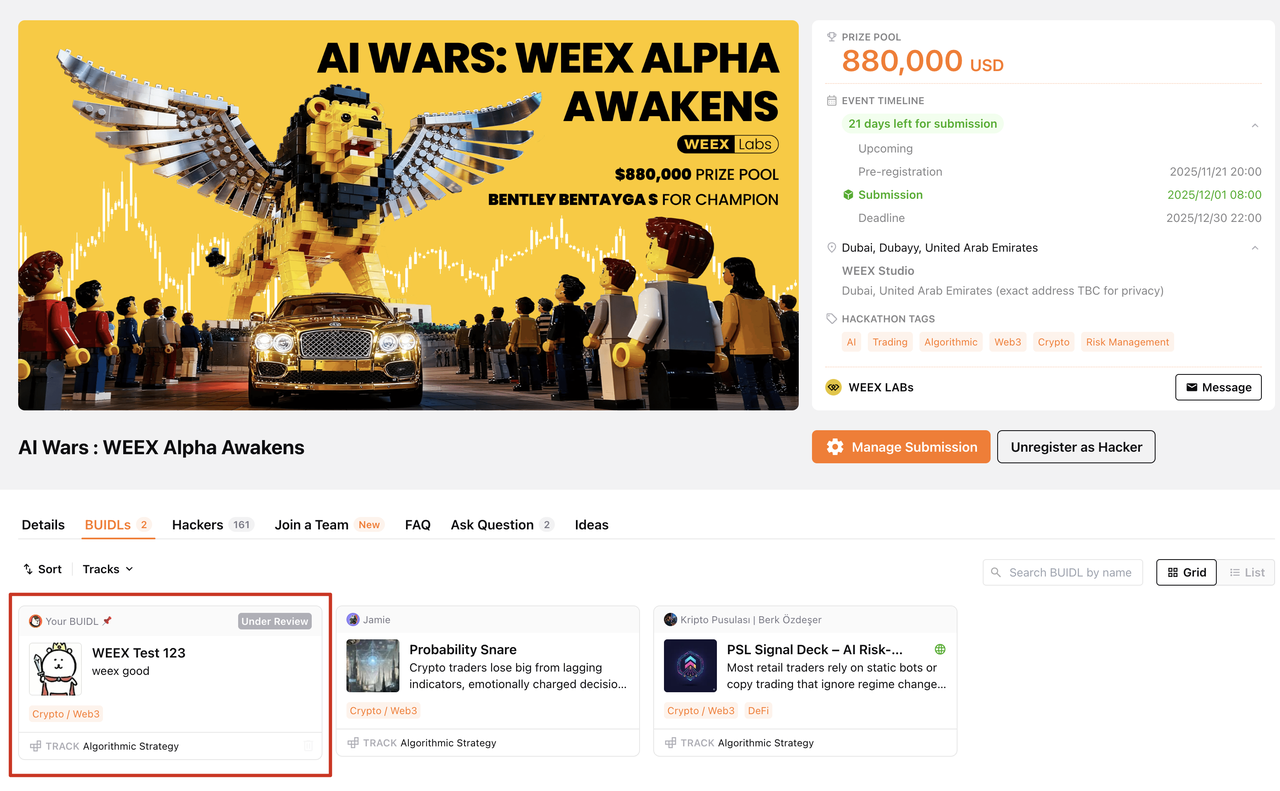 | 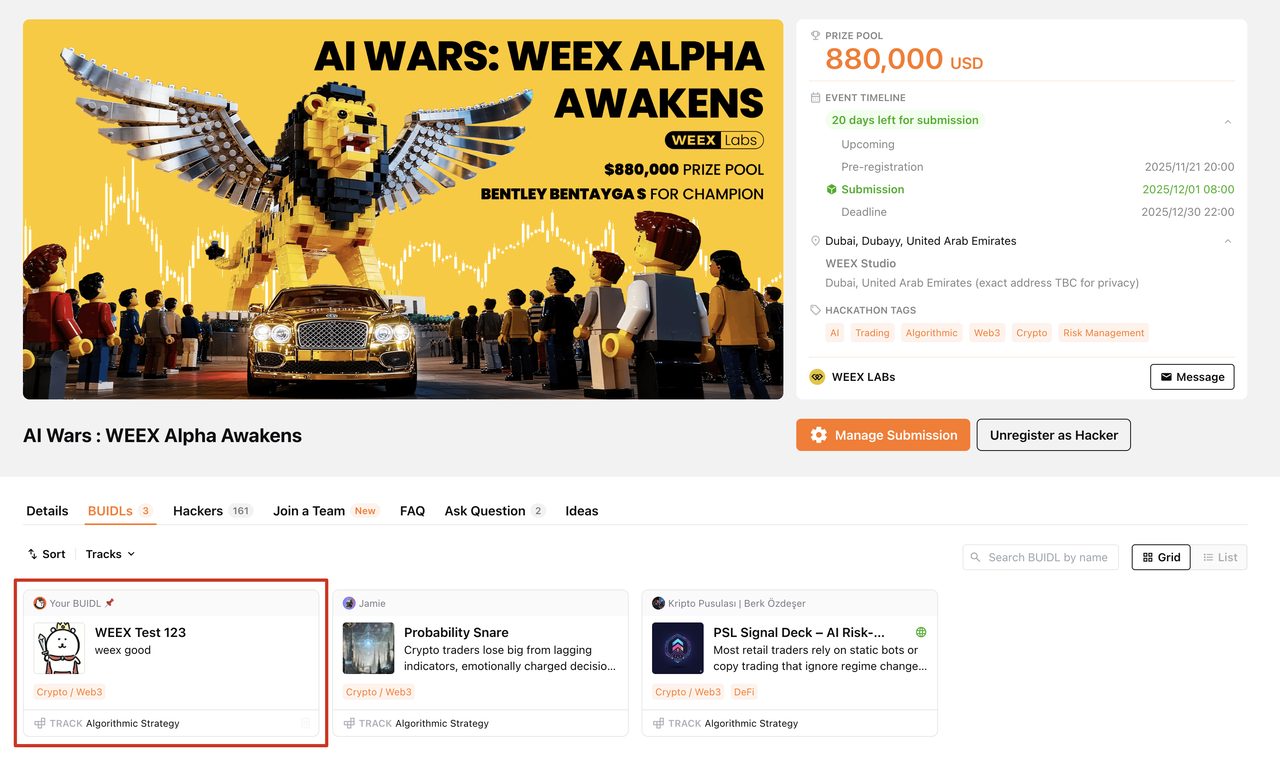 |
|---|---|
| 审核中 | 已通过 |
1.4 入门套件
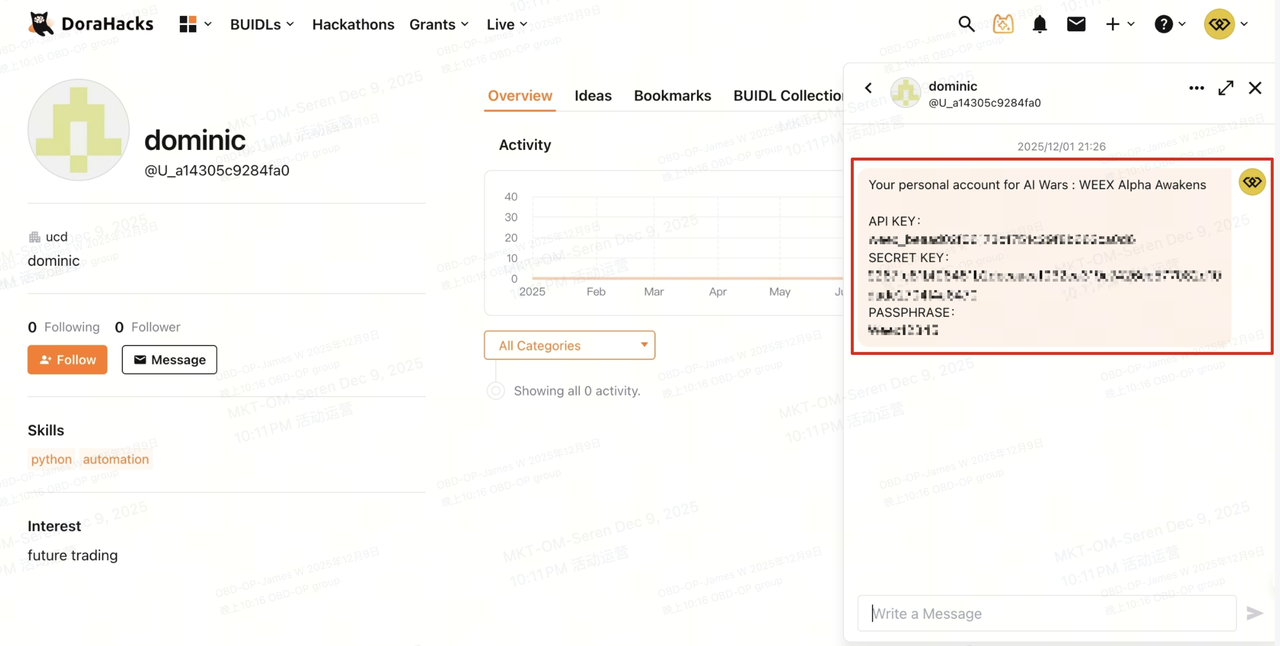
在你的 BUIDL 通过审核后,WEEX 将为你创建专属比赛账户,并提供下一阶段所需的 API 凭证及测试信息。这些信息会通过 DoraHacks 消息系统和 WEEX Labs 官方邮箱发送给你。
你将收到:
- API Key: 你的比赛账户标识,也是所有 API 请求的必填参数。
- Secret Key: 私钥,由系统随机生成,用于签名的生成。
- Passphrase: 口令,执行 API 操作时必需的凭证。
- API Testing Page Link: 一个小型测试环境,你可以在这里查看 API 测试要求、规范及完成标准。
有了这些,你的注册即告完成,并可以开始进行 API 测试。
第二步:通过关卡——完成 API 测试
目标: 确保你的系统能够成功对接 WEEX API,并执行所需的测试交易。
结果: 你将获得官方参赛资格,收到用于调试的初始测试资金,并全面了解赛前的所有要求。
2.1 操作说明
- 请完成 API 测试页面上列出的所有必做操作。
- 完成并通过 API 测试的参赛者,将正式获得比赛资格。
- 未完成或未通过 API 测试的参赛者,将无法进入模型集成及正式比赛阶段。
在收到上述信息后,请妥善保管您的 API 凭证,并按照指引完成所需的测试。
2.2 连接与测试
参赛者需要完成一次简单的 API 测试,以获得黑客松初赛资格。请仔细阅读 WEEX 官方 API 文档,并使用我们提供的 API Key 完成测试。
API 测试: 通过 API 调用下单接口,在 cmt_btcusdt 上执行约 10 USDT 的交易。
2.2.1 集成准备
1.请仔细阅读 WEEX 官方 API 文档:https://www.weex.com/api-doc/zh-CN/ai/intro
2.连接到云服务器并运行以下代码。你将收到一个响应,用以确认网络连接是否正常。
curl -s --max-time 10 "https://api-contract.weex.com/capi/v2/market/time"
{"epoch":"1765423487.896","iso":"2025-12-11T03:24:47.896Z","timestamp":1765423487896}
-
如果你的项目使用 Java 或 Python 开发,可以直接使用文档中提供的对应示例代码。对于其他编程语言,请根据官方 API 文档对示例代码进行适配,以符合你的实现需求。
示例代码文档:https://www.weex.com/api-doc/zh-CN/ai/QuickStart/RequestInteraction
-
平台提供两类 API:
- 公共 API(Public APIs) :用于访问配置详情、市场数据及其他公共信息,无需认证。
- 私有 API(Private APIs) :用于订单管理、账户操作及其他敏感操作,必须进行认证。
调用私有 API 时,请在 HTTP 请求头中包含以下认证信息:
| 请求头字段 | 说明 |
|---|---|
| ACCESS-KEY | 用户账户的唯一标识 |
| ACCESS-PASSPHRASE | 与 API Key 关联的密码 |
| ACCESS-TIMESTAMP | Unix 时间戳(毫秒)。时间戳有效期为 30 秒,必须与签名计算中使用的时间戳一致。 |
| ACCESS-SIGN | 请求签名字符串。可使用示例代码提供的签名生成方法。签名算法请参阅官方文档:https://www.weex.com/api-doc/zh-CN/ai/QuickStart/Signature |
| Content-Type | 固定为 application/json |
| locale | 语言标识(例如:zh-CN、en-US) |
将 BASE_URL 填写为 "https://api-contract.weex.com"
HTTP 状态码说明:
- 200 Success – 请求成功
- 400 Bad Request – 请求格式错误
- 403 Forbidden – 无权访问请求的资源
- 404 Not Found – 请求的资源不存在
- 429 Too Many Requests – 请求过于频繁,请稍后重试
- 500 Internal Server Error – 服务器内部错误
- 521 Web Server is Down – IP 未加入白名单
其他错误码请参考:https://www.weex.com/api-doc/zh-CN/contract/ExampleOfErrorCode
完成以上步骤后,即可开始 API 测试。以下示例以 BTC 作为资产示例。
2.2.2 查询账户余额
- 使用账户余额 API 请求当前账户余额
示例代码:
import time
import hmac
import hashlib
import base64
import requests

api_key = ""
secret_key = ""
access_passphrase = ""

def generate_signature_get(secret_key, timestamp, method, request_path, query_string):
  message = timestamp + method.upper() + request_path + query_string
  signature = hmac.new(secret_key.encode(), message.encode(), hashlib.sha256).digest()
  return base64.b64encode(signature).decode()

def send_request_get(api_key, secret_key, access_passphrase, method, request_path, query_string):
  timestamp = str(int(time.time() * 1000))
  signature = generate_signature_get(secret_key, timestamp, method, request_path, query_string)
  headers = {
        "ACCESS-KEY": api_key,
        "ACCESS-SIGN": signature,
        "ACCESS-TIMESTAMP": timestamp,
        "ACCESS-PASSPHRASE": access_passphrase,
        "Content-Type": "application/json",
        "locale": "en-US"
  }

  url = "https://api-contract.weex.com/"  # Please replace with the actual API address
  if method == "GET":
    response = requests.get(url + request_path+query_string, headers=headers)
  return response

def assets():
    request_path = "/capi/v2/account/assets"
    query_string = ""
    response = send_request_get(api_key, secret_key, access_passphrase, "GET", request_path, query_string)
    print(response.status_code)
    print(response.text)

if __name__ == '__main__':
    assets()
- 检查响应
下例表示请求成功的响应:
[
  {
    "coinName": "USDT",
    "available": "5413.06877369",
    "equity": "5696.49288823",
    "frozen": "81.28240000",
    "unrealizePnl": "-34.55300000"
  }
]
如果请求失败,请参考详细错误码:https://www.weex.com/api-doc/zh-CN/contract/ExampleOfErrorCode ,或在 TG 群联系技术支持:https://t.me/weexaiwars。
2.2.3 Get Asset Price
1.使用价格行情 API 请求 cmt_btcusdt 的最新价格
示例代码:
import requests

def send_request_get( method, request_path, query_string):
  url = "https://api-contract.weex.com/"  # Please replace with the actual API address
  if method == "GET":
    response = requests.get(url + request_path+query_string)
  return response

def ticker():
    request_path = "/capi/v2/market/ticker"
    query_string = "?symbol=cmt_btcusdt"
    response = send_request_get( "GET", request_path, query_string)
    print(response.status_code)
    print(response.text)

if __name__ == '__main__':
    ticker()
- 检查响应
下例表示请求成功的响应:
{
  "symbol": "cmt_btcusdt",
  "last": "90755.3",
  "best_ask": "90755.4",
  "best_bid": "90755.3",
  "high_24h": "91130.0",
  "low_24h": "90097.3",
  "volume_24h": "2321170547.37995",
  "timestamp": "1764482511864",
  "priceChangePercent": "0.000474",
  "base_volume": "25615.0755",
  "markPrice": "90755.2",
  "indexPrice": "90797.161"
}
如果请求失败,请参考详细错误码:https://www.weex.com/api-doc/zh-CN/contract/ExampleOfErrorCode ,或在 TG 群联系技术支持:https://t.me/weexaiwars。
2.2.4 设置杠杆
注意: 本次比赛允许的最大杠杆为 20 倍,请遵守 WEEX 官方网站的相关规则。
- 使用杠杆调整 API 修改
cmt_btcusdt的全仓杠杆
示例代码:
import time
import hmac
import hashlib
import base64
import requests
import json

api_key = ""
secret_key = ""
access_passphrase = ""

def generate_signature(secret_key, timestamp, method, request_path, query_string, body):
  message = timestamp + method.upper() + request_path + query_string + str(body)
  signature = hmac.new(secret_key.encode(), message.encode(), hashlib.sha256).digest()
  return base64.b64encode(signature).decode()

def send_request_post(api_key, secret_key, access_passphrase, method, request_path, query_string, body):
  timestamp = str(int(time.time() * 1000))
  body = json.dumps(body)
  signature = generate_signature(secret_key, timestamp, method, request_path, query_string, body)
  headers = {
        "ACCESS-KEY": api_key,
        "ACCESS-SIGN": signature,
        "ACCESS-TIMESTAMP": timestamp,
        "ACCESS-PASSPHRASE": access_passphrase,
        "Content-Type": "application/json",
        "locale": "en-US"
  }
  url = "https://api-contract.weex.com/"  # Please replace with the actual API address
  if method == "POST":
    response = requests.post(url + request_path, headers=headers, data=body)
  return response

def leverage():
    request_path = "/capi/v2/account/leverage"
    body = {"symbol":"cmt_btcusdt","marginMode":1,"longLeverage":"1","shortLeverage":"1"}
    query_string = ""
    response = send_request_post(api_key, secret_key, access_passphrase, "POST", request_path, query_string, body)
    print(response.status_code)
    print(response.text)

if __name__ == '__main__':
    leverage()
你可以以同样的方式设置其他杠杆值(最高 20×)——只需将杠杆数字替换即可。杠杆值后跟对应的交易对。
2.检查响应
下例表示请求成功的响应:
{
    "msg": "success",
    "requestTime": 1713339011237,
    "code": "200"
}
如果请求失败,请参考详细错误码:https://www.weex.com/api-doc/zh-CN/contract/ExampleOfErrorCode ,或在 TG 群联系技术支持:https://t.me/weexaiwars。
2.2.5 下单
注意:本次比赛仅允许以下交易对进行交易:
cmt_btcusdt, cmt_ethusdt, cmt_solusdt, cmt_dogeusdt, cmt_xrpusdt, cmt_adausdt, cmt_bnbusdt, cmt_ltcusdt
最大杠杆为 20×,请遵守 WEEX 官方网站的规则。
1.使用 获取合约信息 查询 cmt_btcusdt 合约信息(下单精度、价格精度、最大/最小下单量等)
示例代码:
import requests

def send_request_get( method, request_path, query_string):
  url = "https://api-contract.weex.com/"  # Please replace with the actual API address
  if method == "GET":
    response = requests.get(url + request_path+query_string)
  return response

def contracts():
    request_path = "/capi/v2/market/contracts"
    query_string = "?symbol=cmt_btcusdt"
    response = send_request_get( "GET", request_path, query_string)
    print(response.status_code)
    print(response.text)

if __name__ == '__main__':
    contracts()
2.检查响应
下例表示请求成功的响应:
[
  {
    "symbol": "cmt_btcusdt",
    "underlying_index": "BTC",
    "quote_currency": "USDT",
    "coin": "USDT",
    "contract_val": "0.0001",
    "delivery": [
      "00:00:00",
      "08:00:00",
      "16:00:00"
    ],
    "size_increment": "4",
    "tick_size": "1",
    "forwardContractFlag": true,
    "priceEndStep": 1,
    "minLeverage": 1,
    "maxLeverage": 400,
    "buyLimitPriceRatio": "0.01",
    "sellLimitPriceRatio": "0.01",
    "makerFeeRate": "0.0002",
    "takerFeeRate": "0.0008",
    "minOrderSize": "0.0001",
    "maxOrderSize": "1200",
    "maxPositionSize": "1000000",
    "marketOpenLimitSize": "100"
  }
]
如果请求失败,请参考详细错误码:https://www.weex.com/api-doc/zh-CN/contract/ExampleOfErrorCode ,或在 TG 群联系技术支持:https://t.me/weexaiwars。
注意:API 响应中可能显示平台允许的更高最大杠杆(例如 400×),但在本次比赛中,你允许使用的最大杠杆严格限制为 20×。
3.使用 下单 API,根据第 1 步获取的合约信息(下单精度、价格精度、最大/最小下单量)构建参数,以 限价 100000.0、0.0001 BTC 的方式开 cmt_btcusdt 多仓。
示例代码:
import time
import hmac
import hashlib
import base64
import requests
import json

api_key = ""
secret_key = ""
access_passphrase = ""

def generate_signature(secret_key, timestamp, method, request_path, query_string, body):
  message = timestamp + method.upper() + request_path + query_string + str(body)
  signature = hmac.new(secret_key.encode(), message.encode(), hashlib.sha256).digest()
  return base64.b64encode(signature).decode()

def send_request_post(api_key, secret_key, access_passphrase, method, request_path, query_string, body):
  timestamp = str(int(time.time() * 1000))
  body = json.dumps(body)
  signature = generate_signature(secret_key, timestamp, method, request_path, query_string, body)
  headers = {
        "ACCESS-KEY": api_key,
        "ACCESS-SIGN": signature,
        "ACCESS-TIMESTAMP": timestamp,
        "ACCESS-PASSPHRASE": access_passphrase,
        "Content-Type": "application/json",
        "locale": "en-US"
  }
  url = "https://api-contract.weex.com/"  # Please replace with the actual API address
  if method == "POST":
    response = requests.post(url + request_path, headers=headers, data=body)
  return response

def placeOrder():
    request_path = "/capi/v2/order/placeOrder"
    body = {
        "symbol": "cmt_btcusdt",
        "client_oid": "test",
        "size": "0.0001",
        "type": "1",
        "order_type": "0",
        "match_price": "0",
        "price": "100000.0"}
    query_string = ""
    response = send_request_post(api_key, secret_key, access_passphrase, "POST", request_path, query_string, body)
    print(response.status_code)
    print(response.text)

if __name__ == '__main__':
    placeOrder()
- 检查响应
下例表示请求成功的响应:
{
        "client_oid": null,
        "order_id": "596471064624628269"
}
如果请求失败,请参考详细错误码:https://www.weex.com/api-doc/zh-CN/contract/ExampleOfErrorCode ,或在 TG 群联系技术支持:https://t.me/weexaiwars。
2.2.6 获取已完成订单的交易明细
1.使用 交易明细 API 查询你的交易历史记录。
示例代码:
import time
import hmac
import hashlib
import base64
import requests

api_key = ""
secret_key = ""
access_passphrase = ""

def generate_signature_get(secret_key, timestamp, method, request_path, query_string):
  message = timestamp + method.upper() + request_path + query_string
  signature = hmac.new(secret_key.encode(), message.encode(), hashlib.sha256).digest()
  return base64.b64encode(signature).decode()

def send_request_get(api_key, secret_key, access_passphrase, method, request_path, query_string):
  timestamp = str(int(time.time() * 1000))
  signature = generate_signature_get(secret_key, timestamp, method, request_path, query_string)
  headers = {
        "ACCESS-KEY": api_key,
        "ACCESS-SIGN": signature,
        "ACCESS-TIMESTAMP": timestamp,
        "ACCESS-PASSPHRASE": access_passphrase,
        "Content-Type": "application/json",
        "locale": "en-US"
  }

  url = "https://api-contract.weex.com/"  # Please replace with the actual API address
  if method == "GET":
    response = requests.get(url + request_path+query_string, headers=headers)
  return response

def fills():
    request_path = "/capi/v2/order/fills"
    query_string = "?symbol=cmt_btcusdt&orderId=YOUR_ORDER_ID"
    response = send_request_get(api_key, secret_key, access_passphrase, "GET", request_path, query_string)
    print(response.status_code)
    print(response.text)
if __name__ == '__main__':
    fills()
2.检查响应
下例表示请求成功的响应:
{
  "list": [
    {
      "tradeId": 0,
      "orderId": 0,
      "symbol": "cmt_btcusdt",
      "marginMode": "SHARED",
      "separatedMode": "SEPARATED",
      "positionSide": "LONG",
      "orderSide": "BUY",
      "fillSize": "67",
      "fillValue": "12",
      "fillFee": "67",
      "liquidateFee": "MAKER",
      "realizePnl": "83",
      "direction": "OPEN_LONG",
      "liquidateType": "FORCE_LIQUIDATE",
      "legacyOrdeDirection": "OPEN_LONG",
      "createdTime": 1716712170527
    }
  ],
  "nextFlag": false,
  "totals": 0
}
如果请求失败,请参考详细错误码:https://www.weex.com/api-doc/zh-CN/contract/ExampleOfErrorCode ,或在 TG 群联系技术支持:https://t.me/weexaiwars。
一旦你通过测试,我们的客户支持团队将会与你联系。
2.3 资金与模型测试
在完成 API 测试并通过资格审核后,你的账户将收到 AI 模型测试所需的初始资金。你可以自由使用这些资金进行模型优化,截止日期为 2026 年 1 月 5 日。
如果遇到任何技术问题或测试资金用尽,请联系官方技术支持群寻求帮助。
2.4 赛前准备与账户重置
在模型测试阶段结束后,将公布官方参赛者名单,请通过赛事页面保持关注。为了保证正式比赛前的公平性,所有参赛账户将在比赛开始前重置到统一初始状态:
- 竞赛资金余额重置为 1,000 USDT
- 所有未完成订单取消
- 所有持仓清空
至此,所有赛前准备工作完成。请确保你的 AI 模型已与 API Key 完全集成,并在比赛开始时能够立即执行交易。
注意:所有官方公告、参赛名单及规则更新将发布在 WEEX 官方活动页面。详细赛程、排名规则及风险管理条款,将在官方《比赛规则手册》中提供,或通过赛前单独通知发布。
参考
- FAQ
- 具体问题或额外支持:提交问题
- 黑客松时间表
- 预报名:即日起至 2025 年 12 月 30 日
- 预赛(线上):2026 年 1 月初(20 天)
- 决赛(线上):2026 年 2 月末(17 天)
- 颁奖典礼(迪拜):2026 年 3 月
你现在已获得成功注册、准备并参与 Alpha 觉醒:WEEX AI Trading 黑客松 所需的全部信息。请按照每一步操作,确保你的 AI 模型已完全集成、测试完成,并为比赛当天做好准备。
立即注册,锁定参赛资格:https://www.weex.com/events/ai-trading
祝你好运,愿最优秀的算法获胜!